What it does
Noise Reduction by Spectral Subtraction 2
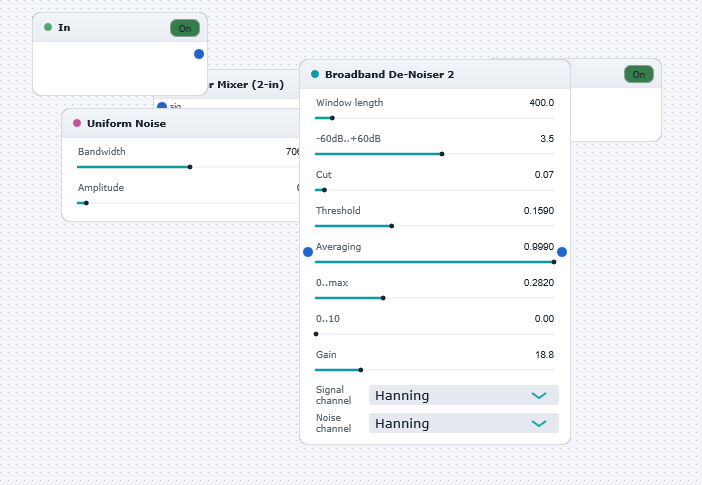
Illustrates the use of the "Broadband De-Noiser 2" block for removing broad-band noise from an audio signal (created here by artificially adding noise to a clean track). The de-noiser works by subtracting an estimate of the noise spectrum from the measured noisy signal spectrum, thereby yielding an approximation of the noise-free signal spectrum (which is converted back to the time domain at the output to give the "cleaned-up" signal). The estimate of the noise spectrum is loaded in from a "template" file (in this case "noise1.txt") via the "Load noise spectrum from file" dialog box. As long as the broad spectral characteristics of the imported noise spectrum "template" are similar to the broad spectral characteristics of the noise corrupting the signal, then the spectral subtraction will be effective.
You can appreciate the effectiveness of the noise reduction by momentarily clicking the "Bypass" checkbox in the de-noiser parameter window. Noise reduction is to some extent a heuristic procedure whose success depends considerably on the relative spectral, temporal, and amplitude characteristics of the signal and noise components in a given track. Experiment with all parameters in the de-noiser to investigate its behaviour, and try with different audio tracks (preferably actual noisy ones rather than artificially noisy ones).
The "template" noise spectra files required by "Broadband De-Noiser 2" can be created and saved using the "Broadband De-Noiser 1" (or "Broadband De-Noiser 3") component which incoporates a real-time noise spectrum estimator via a second input channel. This is how "noise1.txt" used here was created. (The "NoiseReductionBySpectralSubtraction1.dwb" , "NoiseReductionBySpectralSubtraction3.dwb", "NoiseReductionBySpectralSubtraction4.dwb", and "NoiseReductionBySpectralSubtraction5.dwb" example DrawingBoards demonstrates the use of the "Broadband De-Noiser 1" and "Broadband De-Noiser 3" components.)
A suggested mode of operation for cleaning up a set of noisy audio tracks with broadly similar noise characteristics is to initially use "Broadband De-Noiser 1" to estimate the average noise spectrum , save this spectrum to a "template" file, then use "Broadband De-Noiser 2" ( as demonstrated in this DrawingBoard) thereafter for processing the remaining tracks in an efficient manner based on the same "template" noise file.
In addition to creating noise "template" spectra from within Wavewarp, you may create them externally in MATLAB using the m-files bundled with Wavewarp, or by hand using a text editor.
[Ref: "Advanced Signal Processing and Digital Nosie Reduction", Saeed V. Vaseghi, Wiley-Teubner, 1996, chapter 9.]