← All boards
Audio Effects › Flangers

Live Guitar Auto Feedback Flanger

Plays on the mobile app
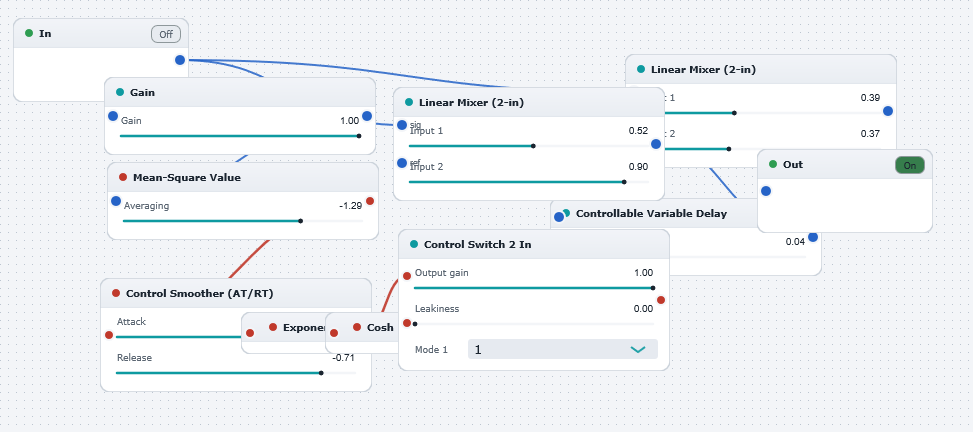
The Live Guitar Auto Feedback Flanger board in the WaveWarp DrawingBoard
Live Guitar Auto Feedback Flanger — the board as it opens in the WaveWarp DrawingBoard.

What it does

Live Guitar Auto-feedback Flanger built from basic elements.

Demonstrates the use of WaveWarp's live input functionality and the powerful modular sample-by-sample architecture. Plug an electric guitar (or any other audio source!) into the "input" of your soundcard and hit "Play". You will experience a weird "auto-flanging" effect. This is an elaboration of the flanger effect whereby the the time-varying delay is controlled from the mean-square power of the input signal, rather than from an oscillator (as in a conventional flanger).

The basic flanging effect is achieved by mixing the audio signal with a time-varying delayed version of itself (via "Linear Mixer (1)". The effect is enhanced by "feeding back" the output of the delay (combined with the audio input via "Linear Mixer (2)") into its own input. The Controllable Variable Delay block implements the time-varying delay. This block has, in addition to the audio input, a control input (red) which is driven by the mean-square of the input signal envelope (computed by the RMS block). The other red components are used to condition the modulating signal in any arbitrary way. For example, two possibilities are shown here. The "Control Switch" allows you to choose between the possibilities. The "Simple Gain" adjusts the signal before the RMS computation, thus controlling the overall "Depth" of the delay modulation (and hence of the flanging effect).

Try experimenting with all settings and with different audio sources. Also, try building different modulation profiles by using different red components (e.g. from the "Basic Math" category of the Component Library) to condition the modulating signal.

Effects used

11 blocks 14 connections
In WaveWarp, 1998

How the original documented it

Live Guitar Auto-feedback Flanger built from basic elements. Demonstrates the use of WaveWarp's live input functionality and the powerful modular sample-by-sample architecture. Plug an electric guitar (or any other audio source!) into the "input" of your soundcard and hit "Play". You will experience a weird "auto-flanging" effect. This is an elaboration of the flanger effect whereby the the time-varying delay is controlled from the mean-square power of the input signal, rather than from an oscillator (as in a conventional flanger). The basic flanging effect is achieved by mixing the audio signal with a time-varying delayed version of itself (via "Linear Mixer (1)". The effect is enhanced by "feeding back" the output of the delay (combined with the audio input via "Linear Mixer (2)") into its own input. The Controllable Variable Delay block implements the time-varying delay. This block has, in addition to the audio input, a control input (red) which is driven by the mean-square of the input signal envelope (computed by the RMS block). The other red components are used to condition the modulating signal in any arbitrary way. For example, two possibilities are shown here. The "Control Switch" allows you to choose between the possibilities. The "Simple Gain" adjusts the signal before the RMS computation, thus controlling the overall "Depth" of the delay modulation (and hence of the flanging effect). Try experimenting with all settings and with different audio sources. Also, try building different modulation profiles by using different red components (e.g. from the "Basic Math" category of the Component Library) to condition the modulating signal.

Components used (1998)

Controllable Variable DelayLinear MixerOutput Single-Mono WAVE DriverLinear MixerMean-Square ValueInput Single-Mono WAVE DriverControl Smoother with AT-RTControl ExponentialControl CoshSimple gainControl Switch 2 Inputs