← All boards
Featured

Welcome

Plays on the mobile app
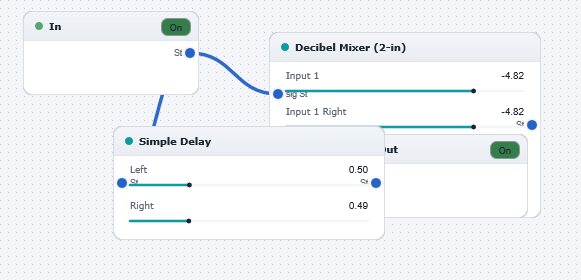
The Welcome board in the WaveWarp DrawingBoard
Welcome — the board as it opens in the WaveWarp DrawingBoard.

What it does

WELCOME TO WAVEWARP !

NOTE: TO STOP THIS EXAMPLE DRAWINGBOARD OPENING EVERYTIME YOU START WAVEWARP, GO TO THE OPTIONS->GENERAL MENU AND CHECK THE BOX LABELLED "Suppress auto-loading of Welcome DrawingBoards"

This simple DrawingBoard provides a basic introduction to the program architecture. It illustrates how to build a stereo digital delay effect using a delay block and a mixer to blend the delayed signal with the original. Play around with the slider settings in the delay and mixer parameter windows to adjust the parameters of the effect on-the-fly.

Try experimenting with different input WAV files (via the "Input Audio Files" category of the Component Library") . Then try modifying the effect by replacing the Simple Delay with a different effect block from the Component Library. After some clicking-and-dragging, you will quickly become acquainted with the simple yet extremely powerful WaveWarp interface. Explore the other Example DrawingBoards to sample the many features of the program.

Effects used

4 blocks 4 connections
In WaveWarp, 1998

How the original documented it

WELCOME TO WAVEWARP ! NOTE: TO STOP THIS EXAMPLE DRAWINGBOARD OPENING EVERYTIME YOU START WAVEWARP, GO TO THE OPTIONS->GENERAL MENU AND CHECK THE BOX LABELLED "Suppress auto-loading of Welcome DrawingBoards" This simple DrawingBoard provides a basic introduction to the program architecture. It illustrates how to build a stereo digital delay effect using a delay block and a mixer to blend the delayed signal with the original. Play around with the slider settings in the delay and mixer parameter windows to adjust the parameters of the effect on-the-fly. Try experimenting with different input WAV files (via the "Input Audio Files" category of the Component Library") . Then try modifying the effect by replacing the Simple Delay with a different effect block from the Component Library. After some clicking-and-dragging, you will quickly become acquainted with the simple yet extremely powerful WaveWarp interface. Explore the other Example DrawingBoards to sample the many features of the program.

Components used (1998)

Input WAV fileDecibel MixerOutput Stereo WAVE DriverSimple delay