← All boards
Sound Synthesis

Amplitude Controlled Oscillator_2

Plays on the mobile app
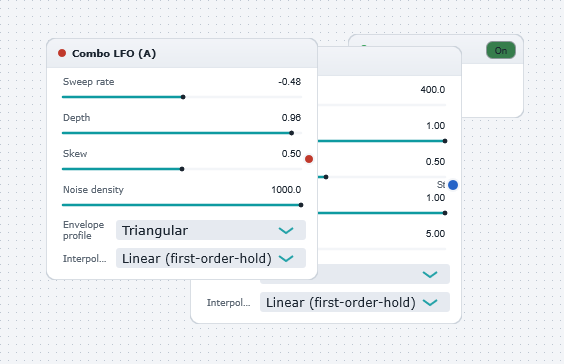
The Amplitude Controlled Oscillator_2 board in the WaveWarp DrawingBoard
Amplitude Controlled Oscillator_2 — the board as it opens in the WaveWarp DrawingBoard.

What it does

Illustrates the use of the amplitude controlled oscillator (the orange block). This generates a tone at a fixed (user-defined) frequency with amplitude controlled by the input "A" control. The Combo Control Generator generates a modulated "A" signal.

Throughout WaveWarp there is a consistent system: any block which requires a red "A" input must generally take its input from a block which generates a red "A" (amplitude) control output. (You may deviate from this system but the results may be unexpected !)

Experiment with all settings to explore the wide range of interesting tones which can be generated by the WaveWarp oscillators.

Effects used

3 blocks 2 connections
In WaveWarp, 1998

How the original documented it

Illustrates the use of the amplitude controlled oscillator (the orange block). This generates a tone at a fixed (user-defined) frequency with amplitude controlled by the input "A" control. The Combo Control Generator generates a modulated "A" signal. Throughout WaveWarp there is a consistent system: any block which requires a red "A" input must generally take its input from a block which generates a red "A" (amplitude) control output. (You may deviate from this system but the results may be unexpected !) Experiment with all settings to explore the wide range of interesting tones which can be generated by the WaveWarp oscillators.

Components used (1998)

Output Stereo WAVE DriverControllable Combo Oscillator (A)Combo Control Generator (A)