← All boards
Multichannel Surround

Live Multi Input Multi Output Example1_2

Plays on the mobile app
The Live Multi Input Multi Output Example1_2 board in the WaveWarp DrawingBoard
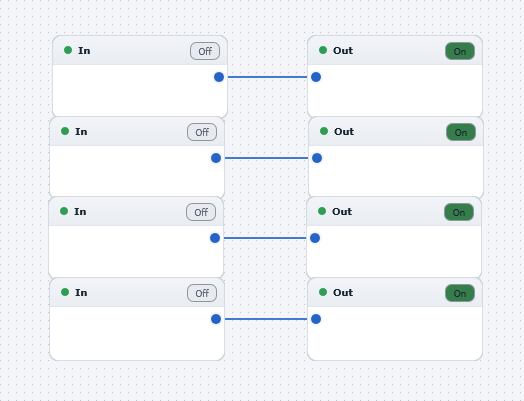
Live Multi Input Multi Output Example1_2 — the board as it opens in the WaveWarp DrawingBoard.

What it does

Live Multi-Input Multi-Output Example 1

Illustrates WaveWarp's live multi-input multi-output functionality. Plug 8 instruments (e.g. electric guitars, microphones, etc) into the 8 inputs of your souncard(s) and plug the 8 outputs of your soundcard(s) into your external mixer/amplifiers/studio, and hit "Play". You will hear your live audio inputs routed directly to the outputs. To record any or all of the inputs, simply connect up the appropriate number of output audio files.

Try inserting some effects (from the hundreds of WaveWarp components available!) between the inputs and the outputs. For example, to mix the signals, simply insert one (or more) mixer components.

Effects used

No effect blocks — a sources/routing board.

8 blocks 4 connections
In WaveWarp, 1998

How the original documented it

Live Multi-Input Multi-Output Example 1 Illustrates WaveWarp's live multi-input multi-output functionality. Plug 8 instruments (e.g. electric guitars, microphones, etc) into the 8 inputs of your souncard(s) and plug the 8 outputs of your soundcard(s) into your external mixer/amplifiers/studio, and hit "Play". You will hear your live audio inputs routed directly to the outputs. To record any or all of the inputs, simply connect up the appropriate number of output audio files. Try inserting some effects (from the hundreds of WaveWarp components available!) between the inputs and the outputs. For example, to mix the signals, simply insert one (or more) mixer components.

Components used (1998)

Input Stereo WAVE DriverInput Stereo WAVE DriverInput Stereo WAVE DriverInput Stereo WAVE DriverOutput Stereo WAVE DriverOutput Stereo WAVE DriverOutput Stereo WAVE DriverOutput Stereo WAVE Driver