← All boards
Miscellaneous

Stereo File Zipper

Plays on the mobile app
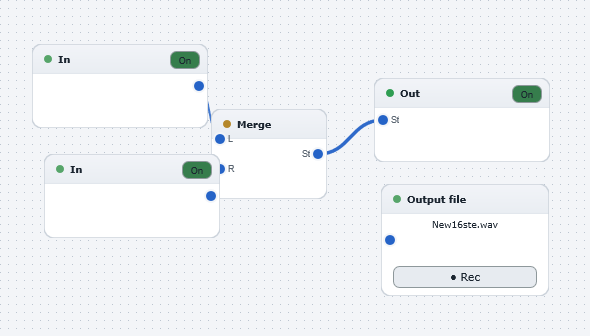
The Stereo File Zipper board in the WaveWarp DrawingBoard
Stereo File Zipper — the board as it opens in the WaveWarp DrawingBoard.

What it does

Illustrates the use of the convenient Zipper block which converts two mono input signals into a single stereo output signal.

To create a stereo file, just connect the output of the Zipper block to the output file component, disconnect from the output device, and hit "play".

[See also the "StereoFileUnzipper.dwb" DrawingBoard which does the opposite using the Unzipper block.]

Effects used

No effect blocks — a sources/routing board.

5 blocks 3 connections
In WaveWarp, 1998

How the original documented it

Illustrates the use of the convenient Zipper block which converts two mono input signals into a single stereo output signal. To create a stereo file, just connect the output of the Zipper block to the output file component, disconnect from the output device, and hit "play". [See also the "StereoFileUnzipper.dwb" DrawingBoard which does the opposite using the Unzipper block.]

Components used (1998)

ZipperInput WAV fileInput WAV fileOutput Stereo WAVE DriverOutput WAV file