What it does
Controllable Playback Atmospheric Synthesiser Example
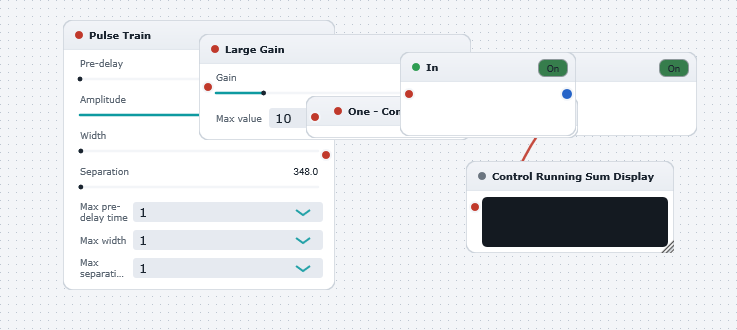
Illustrates the versatility of WaveWarp's controllable file playback feature (see "ControllablePlaybackSimpleExample.dwb" for a detailed description of the controllable playback functionality). In the present example, the "Controllable Input Audio File" ( "bass.wav") is fed a Control Signal which alternates between -1 and +1. (This alternating sequence is created by multiplying the ouput of the Pulse Train Control Generator by 2 (via the Large Control Gain) which produces a sequence which alternates between 0 and 2. The One Minus Control transforms this to the desired -1 to +1 range.)
Play the DrawingBoard. The effect of the -1 / +1 sequence is to periodically skip the file playback pointer backwards in time. With the default settings, the net result is an eery atmospheric tone derived from the bass track. This long, drawn out, effect is obtained by setting the pulse width (default 350 samples) to be numericllay close to the pulse seperation (default 348 samples) so that in combination with the polarity switching between -1 and +1, the net result is that the file playback progresses very slowly (i.e. 350 foward steps followed by 348 backward steps, thus advancing only by 2 steps per 350 samples !). In this example the Control Running Sum Display monitors the actual file playback pointer location by summing the entire history of successive step-sizes. This can be a useful aid when trying to decipher just exactly how the achieved effect is obtained !
Experiment with different settings in the Pulse Train Control Generator and with different audio sources.
See the other "ControllablePlayback...Example" DrawingBoards to appreciate the elaborate effects achievable using WaveWarp's powerful controllable playback feature.
Note: ALL audio files will appear in both the "Controllable Input Audio Files" category and the "Input Audio Files" category so it is possible to play ANY file with or without playback control.