← All boards
Audio Effects › Spectral Transformations

Spectral Cross Synthesis Example2

Plays on the mobile app
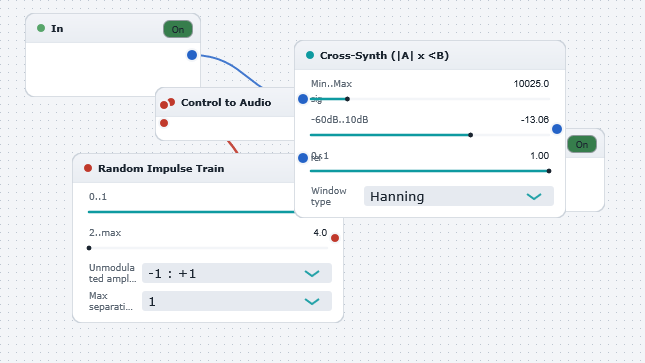
The Spectral Cross Synthesis Example2 board in the WaveWarp DrawingBoard
Spectral Cross Synthesis Example2 — the board as it opens in the WaveWarp DrawingBoard.

What it does

Spectral Cross Synthesis Example 2

Illustrates the use of the Spectral X-Synth 1 block for blending the spectra of 2 audio signals. The Spectral X-Synth 1 block imposes the magnitude of the spectrum of the second input on to the phase of the first input, resulting in a signal with the broad spectral features of the second input but with the temporal characteristics of the first input.

In this example, the spectral magnitude of a random impulse train is imposed on to the phase of the "wavewarp.wav" voice track, creating a heavily distorted version of the voice track. By adjusting the "Blend" parameter in the Spectral X-Synth 1 block, the degree to which the sounds are blended can be controlled.

Try experimenting with all parameters and try using different signal sources to explore the behaviour of the versatile spectral cross synthesis technique.

NOTE: Due to the computational expense inherent to the spectral cross-synthesis technique, this DrawingBoard may exhaust the resources of low-end PC's.

Effects used

5 blocks 4 connections
In WaveWarp, 1998

How the original documented it

Spectral Cross Synthesis Example 2 Illustrates the use of the Spectral X-Synth 1 block for blending the spectra of 2 audio signals. The Spectral X-Synth 1 block imposes the magnitude of the spectrum of the second input on to the phase of the first input, resulting in a signal with the broad spectral features of the second input but with the temporal characteristics of the first input. In this example, the spectral magnitude of a random impulse train is imposed on to the phase of the "wavewarp.wav" voice track, creating a heavily distorted version of the voice track. By adjusting the "Blend" parameter in the Spectral X-Synth 1 block, the degree to which the sounds are blended can be controlled. Try experimenting with all parameters and try using different signal sources to explore the behaviour of the versatile spectral cross synthesis technique. NOTE: Due to the computational expense inherent to the spectral cross-synthesis technique, this DrawingBoard may exhaust the resources of low-end PC's.

Components used (1998)

Output Single-Mono WAVE DriverInput WAV fileRandom Impulse Control Generator (A)Control to AudioSpectral X-Synth 1