← All boards
Audio Effects › Modulation

User Programmable Envelope Example

Plays on the mobile app
The User Programmable Envelope Example board in the WaveWarp DrawingBoard
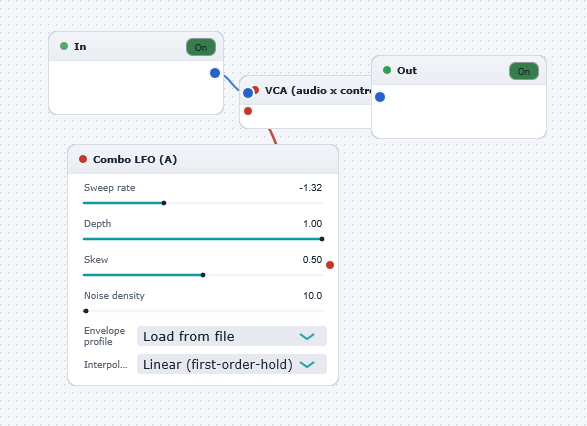
User Programmable Envelope Example — the board as it opens in the WaveWarp DrawingBoard.

What it does

User Programmable Envelope Example

Illustrates how straightforward it is to import user-defined envelope functions into WaveWarp. In this example, the ASCII file "envelope.txt" (in the wwtables/demo) directory contains the data [0 1 0.5 0.5 1 0] stored as a very short wavetable (i.e. 6 entries). This file was created in MATLAB (via the script "wwxampl6.m" in the wwmatlab directory), but could easily by created by hand using a text editor (examine the contents of the file to see how simple it is !). When it is imported by the Combo Control Generator block, the 6 entries are interpolated (linearly or staircase) to create a wavetable which can be used to generate a control signal for any purpose. In this example, it is used to modulate the volume of playback. The depth and time duration of the modulation are fully adjustable via the "Depth" and "Sweep rate" parameters, respectively.

Try creating your own control enevlopes and use them for even more interesting purposes (e.g. creating your own flanging, phaser, or chorus sweep profiles, or building interesting multi-channel panners !)

NOTE: For speed, WaveWarp reads wavetables in reverse order so you must take this into consideration when building your envelopes i.e. store the envelope in the reverse order ! (the example here is symmetric so it makes no difference).

Effects used

4 blocks 3 connections
In WaveWarp, 1998

How the original documented it

User Programmable Envelope Example Illustrates how straightforward it is to import user-defined envelope functions into WaveWarp. In this example, the ASCII file "envelope.txt" (in the wwtables/demo) directory contains the data [0 1 0.5 0.5 1 0] stored as a very short wavetable (i.e. 6 entries). This file was created in MATLAB (via the script "wwxampl6.m" in the wwmatlab directory), but could easily by created by hand using a text editor (examine the contents of the file to see how simple it is !). When it is imported by the Combo Control Generator block, the 6 entries are interpolated (linearly or staircase) to create a wavetable which can be used to generate a control signal for any purpose. In this example, it is used to modulate the volume of playback. The depth and time duration of the modulation are fully adjustable via the "Depth" and "Sweep rate" parameters, respectively. Try creating your own control enevlopes and use them for even more interesting purposes (e.g. creating your own flanging, phaser, or chorus sweep profiles, or building interesting multi-channel panners !) NOTE: For speed, WaveWarp reads wavetables in reverse order so you must take this into consideration when building your envelopes i.e. store the envelope in the reverse order ! (the example here is symmetric so it makes no difference).

Components used (1998)

Combo Control Generator (A)Input WAV fileMultiply Audio by ControlOutput Single-Mono WAVE Driver